Description
.caa-budget{font-family:inherit;color:#17283b;line-height:1.75;max-width:1160px;margin:auto}.caa-budget *{box-sizing:border-box}.caa-budget h2,.caa-budget h3{color:#17283b!important;line-height:1.22;margin:0 0 16px}.caa-budget h2{font-size:clamp(26px,4vw,38px)}.caa-budget h3{font-size:21px}.caa-budget p{color:#17283b;margin:0 0 18px}.caa-budget section{margin-top:36px}.caa-budget .bo-hero{padding:clamp(24px,5vw,48px);border-radius:20px;border:1px solid #d8e3ed;background:#eff6fb}.caa-budget .bo-label{color:#0866a6;font-size:12px;font-weight:800;letter-spacing:.12em;text-transform:uppercase}.caa-budget .bo-split{display:grid;grid-template-columns:1.15fr 1fr;gap:30px;align-items:center}.caa-budget .bo-tags{display:flex;gap:8px;flex-wrap:wrap}.caa-budget .bo-tags span{padding:6px 12px;background:white;border:1px solid #d8e3ed;border-radius:24px;font-size:14px}.caa-budget .bo-grid{display:grid;grid-template-columns:repeat(3,1fr);gap:18px}.caa-budget .bo-card{border:1px solid #d8e3ed;padding:24px;border-radius:14px;background:white}.caa-budget img{display:block;width:100%;height:auto}.caa-budget .bo-parts img{height:190px;object-fit:contain;margin:0 auto 18px}.caa-budget table{border-collapse:collapse;width:100%;font-size:15px}.caa-budget th,.caa-budget td{padding:14px;text-align:left;vertical-align:top;border-bottom:1px solid #d8e3ed;color:#17283b}.caa-budget th{background:#f3f7fb;width:27%}.caa-budget a{color:#075d9d;text-decoration:underline}.caa-budget .bo-button{display:inline-block;padding:12px 22px;background:#075d9d;color:white!important;border-radius:8px;text-decoration:none;font-weight:700}.caa-budget .bo-panel{padding:28px;border-radius:16px;background:#eff6fb}.caa-budget details{border:1px solid #d8e3ed;border-radius:14px;overflow:hidden}.caa-budget summary{cursor:pointer;padding:22px;background:#f1f6fb;font-weight:700;color:#17283b}.caa-budget .bo-guide{padding:28px}.caa-budget .bo-guide h3{margin-top:30px}.caa-budget .bo-guide h3:first-child{margin-top:0}.caa-budget ul{padding-left:22px}@media(max-width:720px){.caa-budget .bo-split,.caa-budget .bo-grid{grid-template-columns:1fr}.caa-budget th,.caa-budget td{font-size:14px;padding:11px 9px}.caa-budget .bo-guide{padding:20px}}
Get the everyday work done. Keep your budget in check.
Emails, documents, browsing and daily administration. The CAA budget office PC gives you a complete desktop built around the AMD Ryzen 5 5500GT, with 8GB G.Skill memory, a 256GB Lexar SSD and built-in ASUS Wi-Fi.
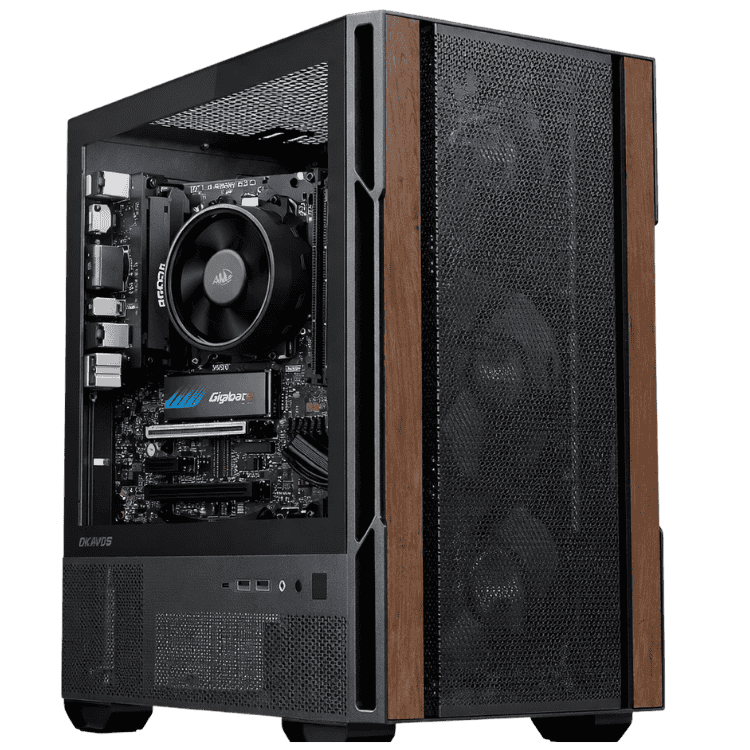
A wood-front Okinos case gives your workspace a smart finish. Named components, professional assembly and local support make this an affordable office computer you can compare with confidence.
Ryzen 5 5500GT8GB DDR4256GB SATA SSDBuilt-in Wi-Fi650W Bronze PSU
Ready to order? Select your warranty in the product options above, then add your budget office PC to the cart.

Know exactly what your budget office PC includes.
| Processor | AMD Ryzen 5 5500GT · 3.6GHz base · 6 cores / 12 threads |
|---|---|
| CPU cooler | AMD Wraith Stealth air cooler |
| Motherboard | ASUS PRIME B550M-A WIFI II · Micro ATX · AM4 · Built-in Wi-Fi |
| Memory | G.Skill Aegis 8GB · 1 × 8GB · DDR4-3200 CL16 |
| Storage | Lexar NS100 256GB · 2.5-inch SATA SSD |
| Graphics | Integrated AMD Radeon graphics |
| Case | Okinos Cypress 3 Wood · MicroATX mini tower |
| Power supply | MSI MAG A650BN 650W · 80 PLUS Bronze |
| Windows | Windows 11 installed and activated |
| Preparation | Professional assembly, driver installation, configuration and stability testing |
| Warranty | 1-year return-to-base warranty included · Optional 2-year or 3-year cover |
A budget office PC for the tasks you actually do.
Everyday administration.
A practical starting point for email, documents, online forms, calendars and business portals. Keep the configuration focused on routine office tasks.
Home office and study.
Set up a dedicated desk for browsing, homework, household administration and everyday work, using your existing screen and peripherals.
Prepared by a local team.
Your desktop is assembled, configured and tested by CAA Computers, with drivers installed and assistance available from our Kingsgrove team.
Named parts behind your daily work.

AMD Ryzen processing.
The Ryzen 5 5500GT provides six cores, twelve threads and integrated Radeon graphics in this budget office PC.

ASUS Wi-Fi motherboard.
The PRIME B550M-A WIFI II supplies the AM4 platform and built-in Wi-Fi, with no separate wireless card listed.

Lexar solid-state storage.
The NS100 256GB is a SATA SSD for Windows, applications and everyday files. Ask about extra capacity if you need it.
Choose the cover that suits you.
Your budget office PC includes a 1-year return-to-base warranty. Optional 2-year cover adds $99, or choose 3-year cover for $149. Select your preferred term beside Add to Cart.
At the listed $779 base price, those options take the tower to $878 or $928 before delivery and other changes. Return-to-base service can require returning the computer for inspection or repair. Warranty terms apply.
Need more memory, storage or Office software?
Tell us before ordering. We can discuss a configuration for your workload, or you can compare the Professional business desktop with Office included. Software inclusions depend on the product and agreed order.
For help choosing your budget office PC, call 0459 681 726 with your application list and budget. Confirm available build timing and delivery before ordering if you need the desktop by a particular date.
Read more: budget office PC buying guide, features and FAQs
Is this budget office PC right for me?
This budget office PC is aimed at straightforward desktop tasks: email, web browsing, documents, online forms and day-to-day administration. The combination of a Ryzen processor, 8GB memory and SSD storage gives you a clearly specified starting configuration. Match it to the applications you actually use rather than choosing by a general performance slogan.
Start with a short description of your typical day. A budget office PC used for a few browser tabs and correspondence has different requirements from a machine handling large spreadsheets, demanding databases or specialist production software. If your workload is heavier, discuss the configuration before ordering so the memory, storage and software can be considered together.
What makes a good cheap office PC?
A cheap office PC should explain what is supplied. This budget office PC names the processor, motherboard, RAM, SSD, case and power supply so you can compare the complete system. Check whether another advertised desktop includes Wi-Fi, Windows preparation, assembly and warranty before comparing prices.
Choosing a budget office PC is a decision about the whole package. Your delivered cost can change when you add accessories, longer cover or a different configuration. Review the final order total and your actual requirements before payment. Clear inclusions are more useful than an unexplained claim that a computer outperforms every alternative.
A Ryzen 5 budget office PC
The AMD Ryzen 5 5500GT has six processor cores and twelve threads, with a 3.6GHz base clock. In this budget office PC it is paired with integrated Radeon graphics, avoiding a separate graphics-card purchase for the listed configuration. The included AMD Wraith Stealth cooler provides the processor’s air-cooling solution.
The processor name is one part of choosing a budget office PC. Memory capacity, storage and software requirements still matter. If an application provider publishes a recommended specification, share it with us before ordering. That is a better basis for advice than assuming one processor makes every application behave the same way.
Why is the memory listed as 1 × 8GB?
Your budget office PC contains one G.Skill Aegis 8GB module, rated DDR4-3200 CL16. That is 8GB total, not a 16GB kit. It is also a single-module configuration, so it should not be confused with a two-module dual-channel kit when comparing desktop offers.
For a budget office PC used with more browser tabs or several applications together, ask about a 16GB configuration before purchase. Tell us what you normally keep open so we can discuss a suitable option. Any changes to the standard build should be quoted and agreed before the computer is assembled.
Understanding the 256GB SATA SSD
The Lexar NS100 in this budget office PC is a 256GB, 2.5-inch SATA solid-state drive. It is not the 512GB NVMe model used in the Professional configuration. Keeping the capacity and interface clear makes it easier to compare the two products and choose around your storage needs.
Windows, applications, formatting and updates use some of the advertised space. Consider the documents, photographs and downloaded files you expect to keep locally. A budget office PC with 256GB may suit a small local file collection; if you keep larger archives, ask for extra storage rather than assuming the listed drive will cover every future need.
Can this affordable office computer connect to Wi-Fi?
The ASUS PRIME B550M-A WIFI II motherboard includes Wi-Fi, so a separate TP-Link wireless adapter is not part of this budget office PC specification. Your connection still depends on the router, network coverage and service available at your location. Discuss any particular workplace networking requirements before ordering.
Place your budget office PC where its connections and ventilation are accessible. If you are replacing an existing desktop, tell us how it connects to the network and which peripherals you intend to reuse. That helps identify the practical details of the complete setup rather than concentrating only on the tower’s headline price.
Does the budget office PC include Windows?
Windows 11 is installed and activated, with hardware drivers installed and the system configured and tested before supply. You will still need to complete any first-use prompts and sign in to your own accounts. A prepared budget office PC does not automatically include every application or online service your workplace uses.
If your organisation requires a particular Windows edition, management feature or security configuration, confirm those details before ordering. The budget office PC should match your workplace requirements as well as its hardware needs. Specialist setup, account migration and application licensing can be discussed separately when you explain the scope of the work.
What about Word, Excel and Microsoft Office?
Check the software included in the agreed order. The standard hardware list for this budget office PC does not list a Microsoft Office package. If Word, Excel, PowerPoint, Outlook or Access are an important part of your purchase, discuss the software requirement before you order.
You can compare the Professional package linked above if you want a desktop advertised with Office included. The budget office PC and Professional product have different hardware and software specifications. Review the edition, licence and support lifecycle of any supplied software so the purchase matches your organisation’s requirements rather than relying on an application name alone.
An office PC under $800
The listed $779 base tower price makes this an office PC under $800 before delivery and paid changes. That price distinction matters when planning a complete desk setup. The budget office PC price does not automatically include a monitor, keyboard, mouse, webcam or any other accessory unless it is explicitly added to your order.
If your overall allowance includes delivery and peripherals, give us the complete budget. Choosing a budget office PC around the final delivered cost is more useful than fitting the tower price and then discovering the missing accessories take you beyond your limit. We can discuss what is already available and quote the items you still need.
A home office PC for a dedicated workspace
A home office PC gives you a fixed workspace for correspondence, browsing and routine administration. This budget office PC uses the Okinos Cypress 3 Wood case, with a wood-front presentation that can suit a home desk or office setting. Plan the position of your screen and peripherals around how you work.
Think about calls and meetings as part of the setup. A budget office PC does not replace the need for a suitable microphone, camera or speakers when your work requires them. Tell us what you own and which connections you need to reuse, especially if you are moving from a laptop to a desktop arrangement.
A budget business PC for reception and administration
A budget business PC can be a practical choice for a role centred on routine tasks. This budget office PC is worth considering for email, browser portals, bookings and basic document work. Check any specialist reception, practice-management or booking software against its provider’s requirements before selecting a configuration.
For staff using several applications at once, consider the memory requirement carefully. Choosing a budget office PC should not mean guessing about the workload. A short application list and an outline of normal use will help us discuss whether the standard 8GB configuration or an upgraded quote is appropriate for the role.
Business computers for sale: compare the complete offer
When browsing business computers for sale, compare equivalent specifications. This budget office PC lists the exact SSD, memory arrangement and power supply instead of describing them only by capacity or wattage. A desktop with more memory or a different software package is a different offer even when its processor is similar.
Compare your budget office PC shortlist at the delivered price with your preferred warranty. Include any needed upgrades and accessories in that calculation. You can explore our office computers and work computer range to see how different configurations fit different workloads.
What does the MSI power supply add?
The MSI MAG A650BN in this budget office PC is a named 650W, 80 PLUS Bronze power supply. The rating and model make the supplied part clear before purchase. The wattage is the unit’s rated capacity, not a statement that the desktop continuously consumes that amount of electricity.
Any future change to a budget office PC still needs compatibility checked. A power-supply wattage alone does not establish whether a particular graphics card or other upgrade is suitable. Explain the intended change so the full configuration, required connections, cooling and physical space can be considered before parts are chosen.
Can I upgrade the budget office PC?
Ask about memory or storage changes before ordering your budget office PC. We can discuss your application requirements and provide a quote for a different configuration. A change to capacity, part model or software inclusion can affect the final price and available build timing.
For later changes, our RAM upgrade service and SSD upgrade service provide a starting point for discussing the work. The budget office PC should be checked as a complete system rather than treating every possible replacement component as automatically compatible.
Does it need a dedicated graphics card?
This budget office PC uses the integrated Radeon graphics in the Ryzen 5 5500GT. A separate graphics card is not included in the supplied parts list. For routine office tasks, explain your actual display and application requirements before deciding whether a different graphics configuration is needed.
If you want gaming, demanding visual production or particular display features, discuss them separately. The budget office PC is positioned for basic office and everyday use. We can help you compare it with another configuration rather than assume an office-focused system will suit every specialist workload or graphics requirement.
How is the computer prepared?
Your budget office PC is professionally assembled, with drivers installed and the system configured and stability tested before supply. The preparation brings the listed hardware together as a complete desktop. Keep your order information and agreed specification available if you need assistance identifying any part of the setup.
After receiving your budget office PC, follow the supplied unpacking instructions and position it securely with ventilation clear. Connect your monitor and peripherals, complete any setup prompts and sign in to your accounts. Your own documents and application accounts remain part of your personal or workplace setup unless migration work has been specifically arranged.
Delivery, timing and local assistance
CAA Computers is based in Kingsgrove, NSW, with Australia-wide shipping available. Confirm current build timing and the applicable delivery charge before ordering your budget office PC if you need it by a particular date. Do not assume immediate collection or a particular dispatch date without confirmation.
For questions about your budget office PC, call 0459 681 726 or use the contact link above. If you need help with an existing desktop instead, see our computer repair service. Describe your requirements so we can discuss the relevant product or service before you make a decision.
Planning the complete desk setup
Before buying your budget office PC, take a moment to list what you already own. Include the monitor model, keyboard, mouse, speakers, camera and any printer or scanner you use regularly. Check connection types and whether the accessories still meet your requirements. Reusing suitable equipment can help keep the total purchase within your allowance. A budget office PC is the tower component of that setup, so the other items should be considered separately unless your order explicitly includes them.
If you are replacing a laptop, think about what it provided automatically. Your new budget office PC may need a separate camera or audio device for meetings. The size and position of the screen can also affect how comfortable the workspace feels. Tell us about your intended arrangement if you are unsure which connections or accessories are required. Choosing a budget office PC alongside the equipment you actually use helps make the transition easier and gives you a clearer view of the complete delivered cost.
Files, accounts and your first working day
Prepare the information needed to move from your existing machine before your budget office PC arrives. Make appropriate copies of important files and identify the accounts you need to sign into. Keep installation information for any specialist application and confirm that its licence allows the planned change of computer. A budget office PC purchase does not automatically include moving every application, database or account. If you need assistance with migration, explain the scope before ordering so the work and any service charge can be discussed.
On your first day with the budget office PC, allow time to connect your equipment and complete the relevant account prompts. Check that documents open correctly and that your usual online services are accessible. Keep your previous records available until you have checked the new setup. If your employer manages accounts or security settings, involve the appropriate person before making changes. Your budget office PC can then be set up around the process you already use, with any extra requirements identified rather than left until an urgent task needs completing.
Comparing a budget office PC with the Professional package
Look at the actual differences when comparing this budget office PC with the Professional desktop. The standard build here includes 8GB memory and a 256GB SATA SSD. The Professional product is a separate configuration with its own listed hardware and Office inclusions. Check the current details on that product before deciding. Tell us your normal applications, local file requirements and total allowance if you want help choosing between the two. The useful comparison is the complete package you will receive, including any agreed changes and the applicable delivery charge.
For a shared reception desk, write down the tasks each person performs before choosing equipment. Include printing, scanning, browser services and any application that must remain open during the day. Confirm where files are stored and who manages access to them. Keep a record of the exact supplied configuration and agreed changes with your purchase information. That gives staff a useful reference if they need assistance later. Clear written requirements help you choose suitable equipment and make it easier to discuss support without guessing which components or applications are involved.
Choose your budget office PC with confidence
Review the processor, single-module memory, SATA storage and built-in Wi-Fi against the work you need to do. Your budget office PC should fit the applications and accessories you actually use, with the final specification and complete purchase price clear before checkout.
If the listed configuration suits your needs, select the warranty term near the price and add your budget office PC to the cart. For changes, contact us first with your software list, display details and total budget. We can discuss the configuration and quote any agreed upgrades before your order is finalised.