Description
.caa-storm{–ink:#142338;–blue:#086ac8;–line:#dbe5ef;font-family:inherit;color:var(–ink);line-height:1.7;max-width:1160px;margin:auto}.caa-storm *{box-sizing:border-box}.caa-storm h2,.caa-storm h3{color:var(–ink)!important;line-height:1.2;margin:0 0 16px}.caa-storm h2{font-size:clamp(25px,4vw,38px)}.caa-storm h3{font-size:21px}.caa-storm p{color:var(–ink);margin:0 0 18px}.caa-storm .cs-hero{padding:clamp(24px,5vw,54px);background:linear-gradient(125deg,#edf6ff,#fff);border:1px solid var(–line);border-radius:20px}.caa-storm .cs-label{font-size:12px;font-weight:800;letter-spacing:.13em;text-transform:uppercase;color:#086ac8}.caa-storm .cs-tags{display:flex;flex-wrap:wrap;gap:8px}.caa-storm .cs-tags span{background:#fff;border:1px solid var(–line);border-radius:24px;padding:7px 13px;font-size:14px}.caa-storm .cs-section{margin-top:38px}.caa-storm .cs-grid{display:grid;grid-template-columns:repeat(3,1fr);gap:16px}.caa-storm .cs-card{padding:24px;border:1px solid var(–line);border-radius:14px;background:#fff}.caa-storm table{width:100%;border-collapse:collapse;font-size:15px}.caa-storm th,.caa-storm td{text-align:left;padding:15px;border-bottom:1px solid var(–line);vertical-align:top;color:var(–ink)}.caa-storm th{width:25%;background:#f3f7fb}.caa-storm a{color:#075ba9;text-decoration:underline}.caa-storm .cs-cover{padding:28px;border-radius:16px;background:#edf6ff}.caa-storm details{border:1px solid var(–line);border-radius:14px;overflow:hidden}.caa-storm summary{cursor:pointer;font-weight:700;padding:22px;background:#f3f7fb;color:var(–ink)}.caa-storm .cs-guide{padding:26px}.caa-storm .cs-guide h3{margin-top:28px}.caa-storm .cs-guide h3:first-child{margin-top:0}.caa-storm .cs-note{font-size:14px}.caa-storm .cs-contact{display:inline-block;background:#086ac8;color:#fff!important;padding:12px 22px;border-radius:8px;text-decoration:none;font-weight:700}.caa-storm ul{padding-left:22px}@media(max-width:700px){.caa-storm .cs-grid{grid-template-columns:1fr}.caa-storm th,.caa-storm td{padding:12px 9px;font-size:14px}.caa-storm th{width:30%}.caa-storm .cs-guide{padding:20px}}
Vision Storm • White RTX 5050 gaming PC
White gaming PC. Your setup starts here.
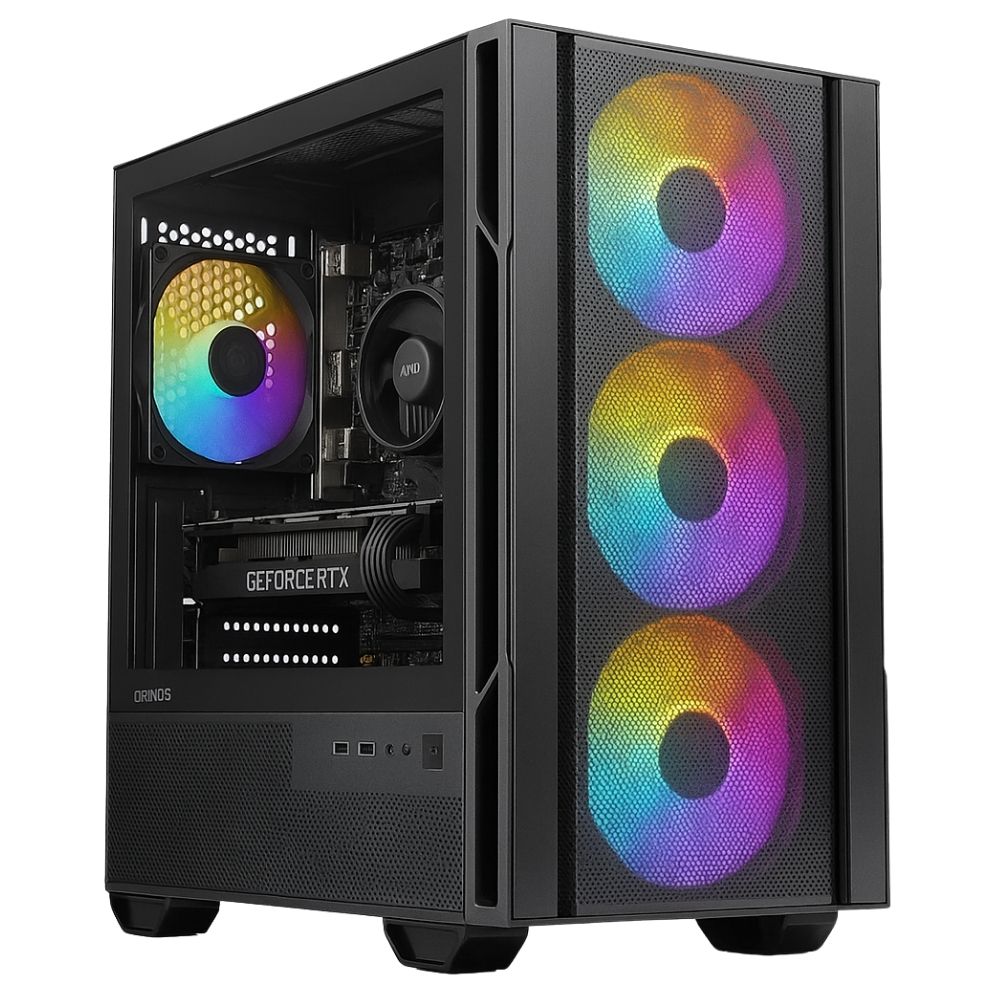
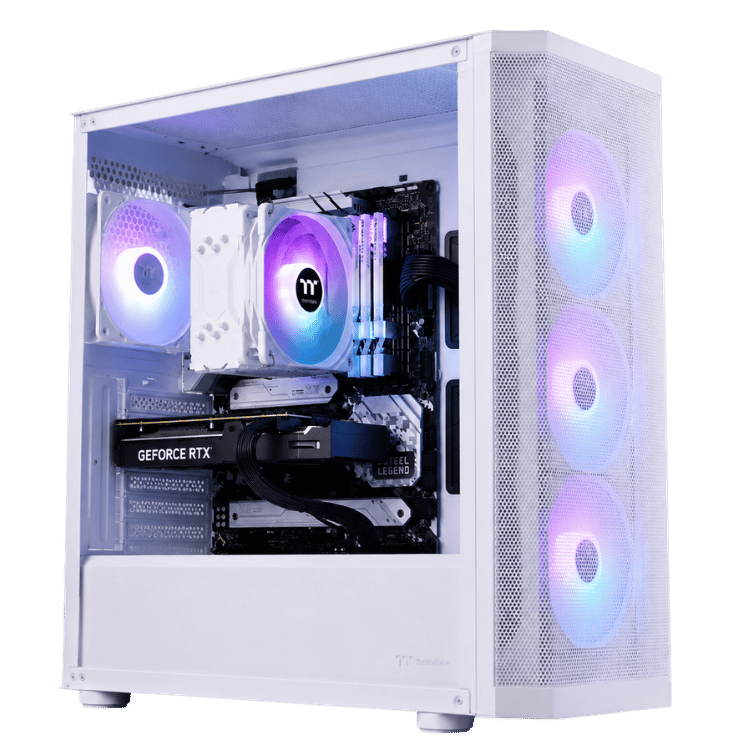
Looking for a gaming PC under $1500? A white RGB build, dedicated NVIDIA graphics and the details that matter. Vision Storm pairs the AMD Ryzen 5 5600 with a Palit Dual GeForce RTX 5050 8GB, dual-channel RGB memory and a Lexar NVMe SSD in a white SilverStone FARA 515XR case.
This white gaming PC comes professionally assembled and tested, with Windows 11 Home installed and activated. Add your monitor and peripherals, sign in and install your games.
Ryzen 5 5600RTX 5050 8GB16GB dual-channel RAM512GB NVMe SSDWi-Fi motherboard1-year warranty included
Know your hardware
Every major component. Named.
Your white gaming PC includes the exact components below. Compare the complete build before you buy, from the graphics card to the power supply.
| Processor | AMD Ryzen 5 5600 6 cores / 12 threads · 3.5GHz base clock |
|---|---|
| Graphics card | Palit Dual GeForce RTX 5050 8GB |
| CPU cooler | Thermaltake UX200 SE ARGB air cooler |
| Motherboard | ASUS PRIME B550M-A WIFI II · Micro ATX · AM4 |
| Memory | TEAMGROUP T-Force Delta RGB 16GB 2 × 8GB · DDR4-3200 · CL16 |
| Storage | Lexar NM620 512GB M.2-2280 · PCIe 3.0 ×4 · NVMe SSD |
| Case | SilverStone FARA 515XR · White · ATX mid tower |
| Power supply | MSI MAG A650BNL 650W · 80 PLUS Bronze |
| Operating system | Windows 11 Home installed and activated |
| Preparation | Professional assembly, cable management, driver installation and stability testing |
| Warranty | 1-year return-to-base warranty included · Optional 2-year or 3-year cover |
A white gaming PC for your everyday setup.
Start with dedicated graphics.
The Palit RTX 5050 has its own 8GB graphics memory. Build your setup around 1080p gaming, with settings adjusted to the games you play and the frame rate you want.
Bring your desk together.
A white SilverStone case, TEAMGROUP RGB memory and Thermaltake ARGB CPU cooler give Storm a coordinated look for a bedroom, study or gaming desk.
Skip the assembly.
Your hardware is assembled, drivers are installed and the PC is tested before dispatch. Windows is activated, so you can focus on setting up your accounts and games.
A setup you can make your own.
White case styling and RGB lighting bring your desk together. Your white gaming PC includes the named components in the specification table above.
Built for your first game night.
Drivers installed, Windows activated and stability tested. Connect your white gaming PC to your monitor and peripherals, then install your games.
Choose your warranty before checkout.
Your white gaming PC includes a 1-year return-to-base warranty. Choose extra cover in the product options near Add to Cart:
- 1 year: included.
- 2 years: add $99.
- 3 years: add $149.
Return-to-base service involves returning the computer to Vision Gaming PC when physical inspection or repair is required. Warranty options are subject to their stated terms.
Ready to make Storm yours?
Choose your warranty in the product options, then select Add to Cart. Your white gaming PC comes assembled and tested. Have a particular game, monitor or upgrade in mind? Speak to Vision Gaming PC about your setup, current build timing and delivery before ordering.
Read more: white gaming PC features, storage and buying questions
Shopping for the best gaming PC under $1500?
The best gaming PC under $1500 for your setup depends on the games you play, the monitor you own and what the price includes. Storm combines a white case, a dedicated Palit RTX 5050, dual-channel TEAMGROUP RAM and activated Windows. This white gaming PC makes those inclusions clear so you can compare like for like.
If you want a white prebuilt gaming PC under $1500, Storm is $1,499 before shipping and paid upgrades. A longer warranty or component upgrade adds to that price. Check the total for your chosen configuration before checkout.
Is Storm the right white gaming PC for me?
This white gaming PC suits buyers who want a complete desktop with a white case, RGB lighting and a dedicated graphics card. The Ryzen 5 5600 and RTX 5050 combination gives this white gaming PC a clear focus: a practical starting point for a 1080p gaming setup, alongside schoolwork, browsing and everyday applications.
If you already own a monitor, tell us its resolution and refresh rate when asking for advice. A 1080p screen and a 4K screen place very different demands on a graphics card. Matching the computer to the games and display you actually use is more useful than buying around a general performance slogan.
What gaming performance should I expect from this white gaming PC?
Game performance varies with the title, resolution, graphics settings and background applications. Competitive settings can prioritise responsiveness, while higher visual settings put more demand on the GPU. Ask us about your specific games if you are deciding between this RTX 5050 gaming PC and a more powerful configuration.
The RTX 5050 supports NVIDIA DLSS features in compatible games. Availability and results depend on the game and settings; generated frames are different from native rendering performance. Learn about the graphics platform on NVIDIA’s official GeForce RTX 5050 page.
Why does this white gaming PC use 2 × 8GB RAM?
Your white gaming PC uses a TEAMGROUP T-Force Delta RGB kit with two 8GB modules, for 16GB total. The listed specification is DDR4-3200 CL16. Naming the kit and module arrangement makes it easier to compare this white gaming PC with systems that only advertise a total memory capacity.
If you regularly keep demanding applications open alongside a game, ask about 32GB before ordering. Any upgrade should be quoted and agreed before the build is finalised.
How much can I store on this white gaming PC?
Your white gaming PC uses the Lexar NM620 512GB NVMe SSD. Windows, updates, applications and formatting use some of that capacity, so the space available for your games will be lower than the advertised drive size. Game installation sizes vary substantially.
A smaller library can suit this configuration. If you keep several large games installed or save gameplay recordings, ask about a larger SSD. Choosing storage around your actual library is better than discovering you need to remove games immediately after buying.
Does this white gaming PC include Wi-Fi and RGB cooling?
The motherboard in your white gaming PC is the ASUS PRIME B550M-A WIFI II. Storm also includes the Thermaltake UX200 SE ARGB air cooler, with RGB lighting alongside the TEAMGROUP memory and the white case presentation.
Your white gaming PC power supply is the MSI MAG A650BNL 650W 80 PLUS Bronze. These named components let you compare the full system rather than relying only on the processor and graphics card headline.
Is Windows activated on my white gaming PC?
Yes. Windows 11 Home is installed and activated on this white gaming PC. Hardware drivers are installed and the system is tested before dispatch. You will still need to complete any first-use prompts, sign in to your own accounts and download the games you own.
A monitor, keyboard, mouse and game licences are separate unless your order explicitly includes them. Connect your display to the graphics card when setting up the computer.
Can I customise this white gaming PC?
Contact us before ordering if you want more storage, more memory or a different graphics card. We can discuss the parts required and provide a quote. Changes can affect price, availability and build timing.
For alternatives, compare our Starter Gamer under $1,500 or explore the gaming PC under $2,000. For a higher budget, see White Fang. Check each product’s current price and configuration before choosing.
A gaming PC under 1500: what should you compare?
Look beyond the CPU and GPU when comparing a budget gaming PC. Storm includes a named MSI 650W Bronze power supply, a Lexar NVMe drive and a Thermaltake ARGB cooler. The white gaming PC specification table also identifies the motherboard and RAM kit, so you can see what your money buys.
Compare the complete delivered price, warranty term and included software. For a gaming PC under $1500, extra storage and peripherals can change the total. We can quote a configuration that fits your overall budget before you order your white gaming PC.
Want your gaming PC white with RGB lighting?
If you want your gaming PC white to suit a lighter desk setup, Storm uses the white SilverStone FARA 515XR case. The RGB memory and CPU cooler add lighting to the build. The case colour describes the exterior; the specification table identifies the actual parts supplied inside your white gaming PC.
What should I check before ordering my white gaming PC?
Check your chosen warranty, delivery cost, available build timeframe and whether you need any peripherals. Contact us if you need the system by a particular date so we can confirm timing before you order.
Choose the warranty option that suits you beside Add to Cart. If you have questions about the hardware, give us your game list and monitor details: we can help you decide whether Storm is the right white gaming PC for your setup.
Choosing a gaming PC under $1500 for your first setup
Your first desktop should make the buying decision easier. Start with the games you want to play, the display you already own and the total amount you want to spend. Storm gives you a named configuration to compare: Ryzen 5 processing, Palit graphics, TEAMGROUP memory, Lexar storage and an MSI power supply. You can see the supporting components as well as the headline hardware.
When choosing a gaming PC under 1500, distinguish the computer budget from the complete setup budget. Storm’s advertised tower price is $1,499 before shipping and paid upgrades. A screen, headset, keyboard, mouse or additional software will need its own allowance unless specifically included in your order. Having those figures clear makes it easier to choose a configuration you can enjoy from day one.
Already have your peripherals? That lets you put more of your available budget towards the desktop itself. Buying everything together? Tell us what you need before ordering. We can discuss the complete setup and provide a quote, so your gaming PC under $1500 does not become an unexpected overspend once the other essentials are added.
What are you paying for beyond the processor and graphics card?
A parts list is only one part of a complete computer. Storm also includes assembly, cable management, driver installation, stability testing and activated Windows 11 Home. Those inclusions matter when you compare a finished desktop with a collection of components that still needs to be assembled and configured.
A gaming PC under 1500 should also have a clear memory configuration and storage specification. Storm’s 16GB comes from two 8GB TEAMGROUP modules, and its Lexar NM620 is identified as a 512GB NVMe SSD. You can compare those details directly rather than guessing what an unspecified memory kit or generic SSD description means.
The same applies to the power supply and cooling. Your white gaming PC includes the MSI MAG A650BNL 650W Bronze unit and Thermaltake UX200 SE ARGB air cooler. If another offer looks cheaper, compare the named parts, included operating system, preparation, warranty and delivered price before deciding which package offers better value for you.
Buying a gaming PC under $1500 for Fortnite or competitive games
Tell us which game modes you play and what you want from your screen. Someone prioritising competitive play may prefer different graphics settings from someone who wants the most detailed presentation. Your resolution, refresh rate and preferred settings are useful starting points when discussing whether Storm matches your expectations.
No single frame rate describes every match, map or update. Background applications and in-game options also affect the experience. If a particular FPS target is essential, ask about evidence for that title and configuration before buying. We would rather help you choose around your requirements than have you assume a general gaming description guarantees a specific result.
If you are comparing a gaming PC under 1500 for several different games, make a short list of the ones you play most. Include any particularly demanding titles and tell us whether you also stream, record gameplay or run other applications at the same time. That helps us discuss whether the standard build or a quoted upgrade is the better fit.
Buying for a teenager, student or family member
You do not need to know every component name to make an informed purchase. The important questions are what the recipient wants to play, what monitor they use and which accessories they already have. Storm’s specification table provides the exact hardware details if you want to share the configuration with them before ordering.
A gaming PC under $1500 can also be an everyday desktop for schoolwork, web browsing and communication. The system includes Windows 11 Home, but individual applications, paid subscriptions and game purchases depend on your own accounts and licences. Ask about any specialist software requirements separately rather than assuming every program is included.
For a gift, contact us about timing before you order. Confirm the available build timeframe, delivery arrangements and whether you need the computer for a particular occasion. Keep the order details and component list with your records so the person receiving the white gaming PC can identify the hardware and available support later.
Planning storage for a gaming PC under 1500
Think about the games you keep installed rather than only the number you own. Installation sizes change with updates, downloadable content and optional texture packs. A 512GB drive has less usable room after Windows, applications and other system files, so the remaining capacity should be considered when planning your library.
Storm uses the Lexar NM620 NVMe SSD for the operating system, applications and games. If you usually play a small selection of titles, you may be comfortable managing that space. If you switch between several large installations or record long gameplay sessions, request a quote for more storage before your build is finalised.
Storage capacity and keeping a backup are separate considerations. Save important documents and personal files in another appropriate location as well as on the desktop. When comparing a gaming PC under $1500, choose enough capacity for your normal use and plan how you will protect files that cannot easily be downloaded again.
What does a white gaming PC change about the setup?
Case colour is part of how the desktop fits your room. Storm uses the white SilverStone FARA 515XR exterior, with RGB memory and an ARGB CPU cooler adding lighting to the presentation. It suits buyers who want the tower to coordinate with a lighter desk, white peripherals or an existing RGB setup.
The white case does not mean every internal component is white. The specification table names the actual motherboard, graphics card, memory, cooler and power supply included in the build. If the colour of a particular component is important to your purchase, ask us to confirm it rather than inferring the complete configuration from a general product image.
Place your white gaming PC where it has practical access to ventilation, power and peripheral cables. Allow room to reach the connections you regularly use. Your desk layout, monitor position and cable routing can all influence how comfortable the complete setup feels once you start using it for longer gaming sessions.
Setting up your gaming PC under $1500
Before powering on, follow the supplied unpacking instructions and remove any internal transit protection as directed. Position the tower securely, connect your screen to the graphics card and attach your keyboard and mouse. Check the monitor’s selected input if the screen does not immediately show the computer’s output.
Windows 11 Home is installed and activated, and hardware drivers are installed before dispatch. Complete any first-use prompts, connect to your network and sign in to the services you use. You can then download your own game launchers and games, with download time depending on your internet connection and the size of each installation.
Once your gaming PC under 1500 is running, check your display resolution and refresh rate in the relevant settings. Start with suitable game settings and adjust them around your preferences. If you need help identifying a connection or setting, contact Vision Gaming PC with the details of your monitor and the issue you are seeing.
Choosing warranty cover with your gaming PC under 1500
Storm includes one year of return-to-base warranty cover. The product options offer two years for an additional $99 or three years for an additional $149. Choose the term you want before adding the computer to your cart, and review the updated order total before completing checkout.
For a gaming PC under $1500, the base price and the price with extended cover are different figures. At the listed $1,499 base price, two-year cover takes the tower to $1,598 and three-year cover takes it to $1,648, before delivery or other paid changes. Compare those complete configurations when weighing up other offers.
Return-to-base cover means physical inspection or repair can require returning the computer to Vision Gaming PC. Read the applicable warranty terms and ask any questions before ordering. Keep your purchase information available and contact us with a clear description if you need assistance with your white gaming PC.
Ready to choose your configuration?
If the listed components meet your requirements, select your warranty near the price and add Storm to your cart. Review the delivery charge and complete order total before payment. If you want a different configuration, contact us first so the parts, price and available timing can be agreed before your order is placed.
Your gaming PC under 1500 should suit the way you actually use your computer. Tell us your budget, main games and monitor details if you are unsure. We can discuss Storm against the other available Vision builds, explain the inclusions and help you choose the setup that fits your plans.
Have questions about Storm? Call our team before ordering and discuss your setup today.