Description
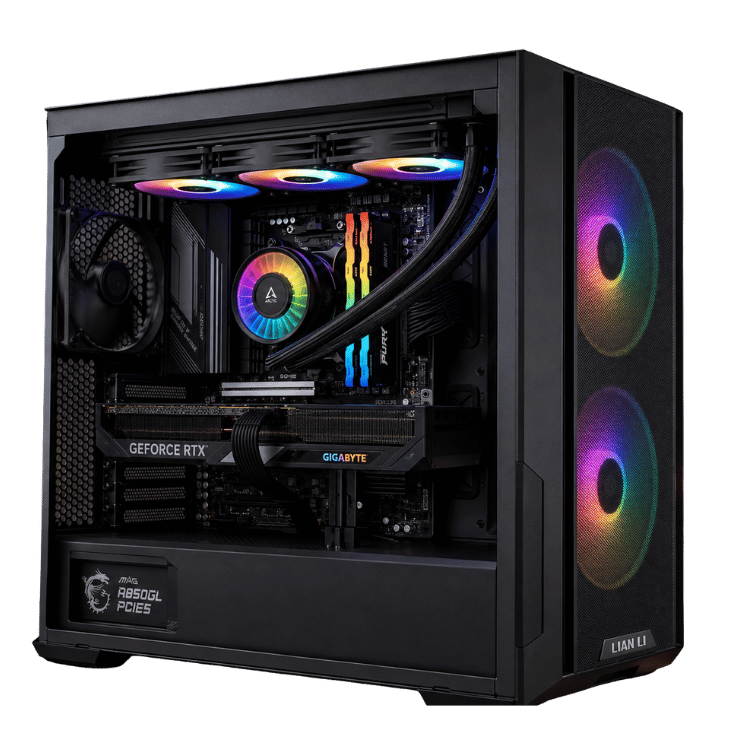
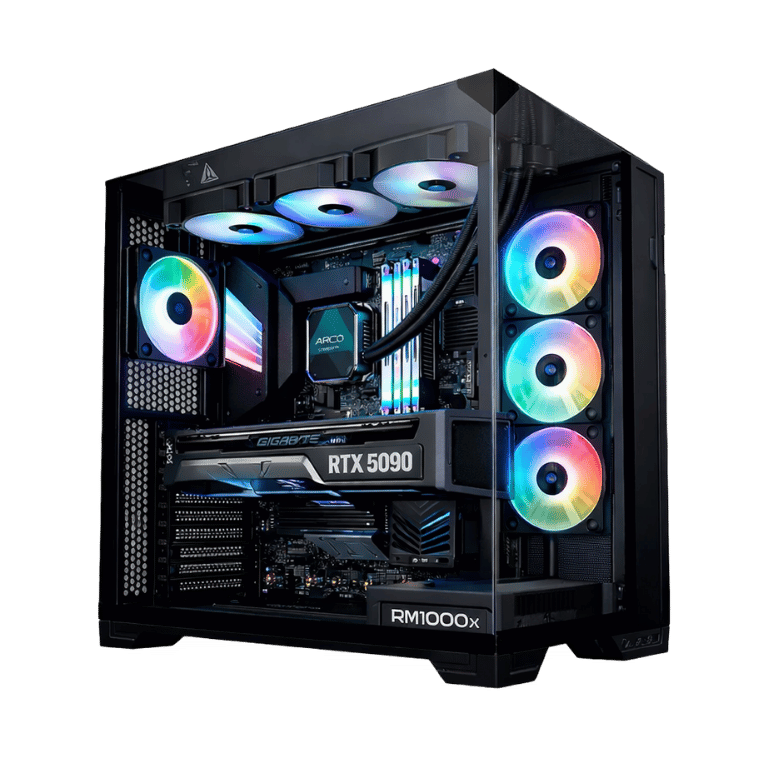
This is the RTX 5090 gaming PC for people who want NVIDIA’s fastest graphics card without paying for workstation extras they’ll never use. We paired the RTX 5090 with the Ryzen 7 9800X3D, AMD’s quickest gaming processor, and kept the rest of the build focused on what matters for games: fast memory, a quick Samsung SSD, a 360mm liquid cooler and a quality 1000W power supply.
In stock now. Order online, or message us on live chat if you’d like to change a part or check a delivery time before we build it.
Who this 5090 gaming PC is for
The RTX 5090 is the top of NVIDIA’s range, and this build is aimed squarely at gamers who want the best possible 4K experience:
- 4K high-refresh players with a 4K 165Hz or 240Hz monitor, especially OLED
- anyone who wants path tracing and maximum settings in the latest games
- sim racers and flight simmers running triple screens or high-resolution VR
- gamers who also stream and want headroom to spare
If you also render, edit 8K video or run large AI models, the TITAN X3D 5090 PC adds a 16-core processor, 96GB of memory and 4TB of storage for that kind of work.
Why the 9800X3D in an RTX 5090 gaming PC
A card as fast as the RTX 5090 needs a processor that can keep it fed, or it ends up waiting. The Ryzen 7 9800X3D has AMD’s 3D V-Cache, a large slab of extra cache stacked with the cores, which games use constantly. That’s why it’s the most popular pairing for a high-end 5090 gaming PC: you get the top frame rates the card can deliver, especially at 1440p and in CPU-heavy games.
For pure gaming, it’s as fast as AMD’s 16-core chips, and it costs less. That’s where the value in this build comes from.
RTX 5090 gaming PC specifications
| Processor | AMD Ryzen 7 9800X3D, 8 cores / 16 threads |
|---|---|
| Graphics card | Gigabyte GeForce RTX 5090 32GB GDDR7 |
| Memory | 32GB (2 × 16GB) DDR5-6000 RGB |
| Storage | Samsung 990 EVO Plus 2TB NVMe SSD |
| Motherboard | MSI X870 Gaming Plus WiFi (Wi-Fi and Bluetooth) |
| CPU cooler | ARCTIC Liquid Freezer III Pro A-RGB 360mm |
| Case | Lian Li O11 Vision Compact |
| Power supply | Corsair RM1000x (2024) 1000W, fully modular |
| Operating system | Windows 11 Home, installed and activated |
| Warranty | 12 months |
What the RTX 5090 brings to a gaming desktop
The GeForce RTX 5090 is NVIDIA’s flagship card, with 32GB of GDDR7, the latest ray tracing hardware and DLSS 4 with multi frame generation. You’ll find the full details on NVIDIA’s RTX 5090 page. For gaming, that means:
- 4K at maximum settings in current games, including path-traced titles with DLSS
- very high refresh rates at 4K with DLSS and frame generation, enough to make use of a 4K 240Hz monitor in many games
- huge headroom at 1440p, where the 9800X3D really shines
- VR at high resolutions and refresh rates
We don’t publish frame-rate charts because they change with every patch. Tell us the games you play and we’ll give you an honest answer on how this RTX 5090 desktop handles them.
Power: why 1000W matters
The RTX 5090 can draw a lot of power on its own, and a 5090 desktop needs a power supply that handles it without strain. The Corsair RM1000x (2024) is a fully modular 1000W unit from one of the most trusted names in power supplies, with a native connector for the graphics card. Fully modular means we only fit the cables the system needs, which keeps the inside of the case clean.
We route the graphics card’s power cable carefully, make sure it’s fully seated, and check it again after stress-testing. It’s a small detail that matters on a card this powerful.
Cooling your RTX 5090 gaming PC
The O11 Vision Compact is a dual-chamber case with glass on three sides, so the RTX 5090 is on full display. The power supply and cables live in the rear chamber, which keeps the main window tidy and gives the graphics card clear airflow. A 360mm ARCTIC Liquid Freezer III Pro handles the processor, moving its heat to the radiator so it doesn’t add to the warm air around the card.
We set the fan curves before shipping. At the desktop, this RTX 5090 gaming PC is quiet. In a demanding game you’ll hear a steady rush of air, which is normal for a card at this level, but no whine or rattle.
Streaming and recording
NVIDIA’s NVENC encoders on the RTX 5090 handle streaming and recording on the graphics card, so your frame rate barely changes when you go live. That makes this RTX 5090 gaming PC a great single-PC streaming setup: game at 4K, stream at high quality, and record locally at the same time.
Power use and running costs
An RTX 5090 desktop uses more power than a mid-range system when gaming hard, typically somewhere in the 600 to 750 watt range at the wall under heavy load, and far less at the desktop or watching videos. The 9800X3D is one of the most efficient gaming processors around, which helps. If running costs matter to you, capping your frame rate to your monitor’s refresh rate is an easy way to cut power use without any visible difference.
Memory and storage in this 5090 desktop
Thirty-two gigabytes of DDR5-6000 is the right amount for a gaming-focused system today. It runs at the speed AMD’s Ryzen processors like best, and two sticks leave two slots free if you want 64GB later. The Samsung 990 EVO Plus 2TB is a fast NVMe SSD with room for Windows and a solid game library, and the X870 motherboard has spare M.2 slots for more.
How long will an RTX 5090 gaming PC last?
Buying at the top of the range is the surest way to keep high settings for years. The RTX 5090’s 32GB of video memory leaves plenty of room as games grow, and DLSS tends to extend a card’s useful life well beyond what raw performance alone would suggest. The AM5 platform, 1000W power supply and spare memory and storage slots mean you can add more RAM, another SSD or a future processor without replacing the core of the system. Realistically, this 5090 gaming PC should stay near the top for a long time.
Choosing a monitor
A 5090 gaming PC deserves a screen that can show what it does. A 4K OLED at 165Hz or 240Hz is the ideal match. Super-ultrawide monitors and triple-screen sim setups also suit it well. Connect your display to the graphics card using DisplayPort or HDMI 2.1, and set the refresh rate in Windows display settings.
How it compares with our other RTX 5090 builds
- Vision Phantom 5090: the same processor and graphics card in a white NZXT H9 Flow, with 64GB of memory.
- TITAN X3D 5090 PC: a 16-core Ryzen 9 9950X3D, 96GB and 4TB, for creators and AI users.
This build is the value pick: the full RTX 5090 gaming experience at the lowest price in our range. Browse the full ultra gaming PC range for more.
Why buy a prebuilt 5090 gaming PC?
When the graphics card alone costs as much as a whole mid-range PC, you want the build done properly. We handle the BIOS update, memory tuning, cable routing, power connection checks and long stress-tests, so the system is proven before it reaches you. If something goes wrong later, you have one place to contact and a 12-month warranty, rather than chasing several manufacturers on your own.
When it arrives
- Open the side panel and remove any packing material from inside the case.
- Connect your monitor to the RTX 5090 and plug the PC into a quality surge-protected power board.
- Run Windows Update and install the latest NVIDIA driver.
- Set your monitor’s refresh rate, then pick a lighting profile you like.
Built and tested in Sydney
- BIOS updated and memory profile enabled
- Windows 11 Home installed and activated, with chipset and graphics drivers
- processor and graphics card stress-tested together while we watch temperatures
- graphics card power connection checked after testing
- fan curves and lighting set, cables tidied and secured
Every system comes with a 12-month warranty, and we deliver Australia-wide.
RTX 5090 gaming PC FAQs
RTX 5090 or RTX 5080: which should I buy?
For most 4K gamers, the RTX 5080 is the better value. Choose the RTX 5090 if you want maximum settings with path tracing, 4K at very high refresh rates, or the most headroom for years to come.
Is 32GB of RAM enough for an RTX 5090 desktop?
For gaming, yes. If you plan to stream heavily, edit video or run AI tools, we can quote 64GB or more before we build.
Does it come with Windows?
Yes. Windows 11 Home is installed and activated, with drivers ready to go.
Does it have Wi-Fi and Bluetooth?
Yes. The MSI X870 Gaming Plus WiFi motherboard has Wi-Fi and Bluetooth built in, plus wired Ethernet for the most consistent online play.
Can I change the case or colour?
Yes. Message us before ordering and we’ll quote other cases, including white builds, along with any difference in price.
What warranty is included?
A 12-month warranty. If anything goes wrong, contact us and we’ll sort it out.
Is it available now?
Yes, it’s in stock. Message us on live chat if you’d like a build and delivery estimate to your postcode before you order.