Description
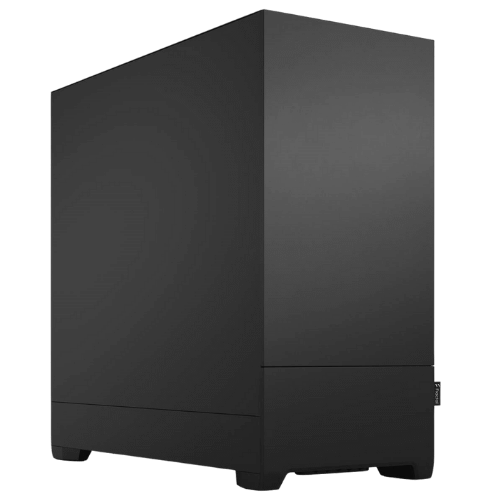
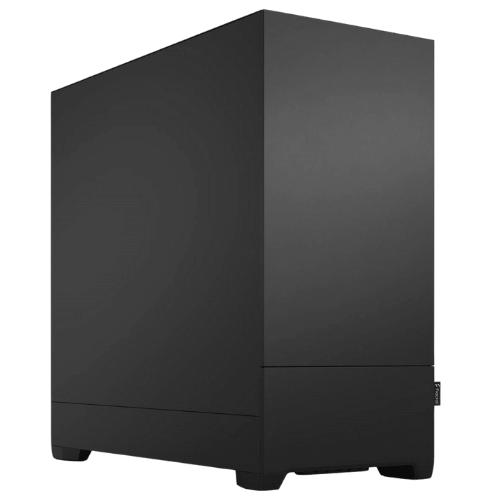
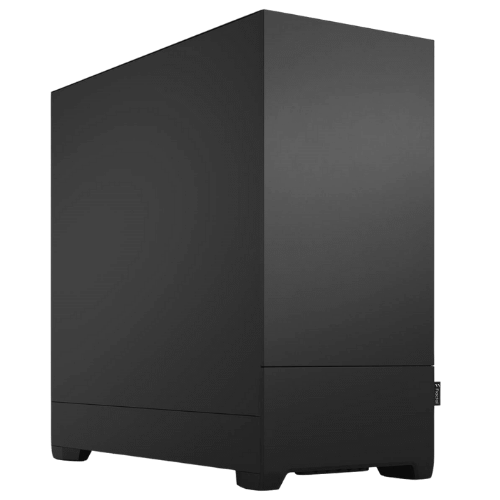
The Vision AI Pro is an AI workstation for developers, researchers and creators who want to run models on their own hardware instead of renting cloud GPUs. At its heart is a Gigabyte GeForce RTX 5070 Ti Eagle OC with 16GB of video memory and full CUDA support, paired with AMD’s 12-core Ryzen 9 9900X and 64GB of DDR5. It’s cooled by a 360mm ARCTIC liquid cooler inside Fractal Design’s quiet Pop XL Silent case, and it ships with Linux installed.
It’s currently $4,999, down from $5,500, and it’s assembled and stress tested by our team in Sydney.
Who this AI workstation is for
- developers building apps on local large language models
- machine learning students and researchers training and fine-tuning models
- data scientists who want GPU acceleration for their notebooks
- creators running Stable Diffusion, Flux and ComfyUI workflows
- businesses that want to keep sensitive data on their own hardware
Just getting started with local AI? Our PC for AI with an RTX 5070 costs less. For heavy research workloads, our Threadripper PC with an RTX 5080 steps up to a high-end platform with ECC memory.
Why 16GB of video memory matters
For AI work, video memory decides what you can run. A model has to fit in the GPU’s memory to run at full speed, so 16GB opens up far more than an 8GB or 12GB card. On this machine learning PC that means:
- quantised language models in the 7B to 14B parameter range run entirely on the GPU with room for context
- image generation with SDXL and Flux, including higher resolutions and batches
- fine-tuning smaller models with LoRA and QLoRA
- training computer vision and tabular models with larger batch sizes
The RTX 5070 Ti also has NVIDIA’s latest Tensor Cores with FP4 support, which newer AI frameworks use to run models faster and in less memory. NVIDIA covers the card on its RTX 5070 family page.
Why NVIDIA for an AI workstation
Almost every AI framework and tutorial is built around NVIDIA’s CUDA platform. PyTorch, TensorFlow, JAX, Hugging Face, Ollama, vLLM, llama.cpp and ComfyUI all support it first. Choosing NVIDIA means less time fighting compatibility and more time building.
What you can build on it
- private chatbots that answer questions from your own documents (RAG)
- local coding assistants that never send your code to the cloud
- speech-to-text and transcription with Whisper
- image generation pipelines for design and marketing
- fine-tuned models for your own data and tasks
- computer vision for inspection, counting and classification
Popular software on this AI workstation
Customers typically run Ollama, LM Studio, llama.cpp and vLLM for language models; ComfyUI and Automatic1111 for image generation; and PyTorch, TensorFlow, Hugging Face Transformers and Jupyter for development. If you rely on a particular framework or version, tell us and we’ll check it before you order.
AI workstation specifications
| Processor | AMD Ryzen 9 9900X (12 cores, 24 threads) |
|---|---|
| CPU cooler | ARCTIC Liquid Freezer III Pro 360 |
| Motherboard | MSI B650M Gaming Plus WiFi |
| Graphics card | Gigabyte GeForce RTX 5070 Ti Eagle OC 16GB |
| Memory | 64GB Crucial DDR5-5600 (2 x 32GB) |
| Storage | 1TB PNY CS1031 NVMe SSD |
| Power supply | SilverStone 750W 80+ Gold |
| Case | Fractal Design Pop XL Silent |
| Operating system | Linux, installed |
A 12-core Ryzen 9 and 64GB: a balanced machine learning PC
The GPU does the heavy lifting in AI, but the rest of the system still matters. The Ryzen 9 9900X’s 12 cores and 24 threads handle data loading, preprocessing, tokenising and everything else running alongside your training jobs. The 64GB of DDR5 gives you room for large datasets in memory, and lets you split models that are a little too big for the GPU across GPU and system memory, which is slower but makes larger models possible.
Storage: plan for your models
The 1TB NVMe SSD is fast, but AI work fills drives quickly. Model weights, datasets, checkpoints and Docker images add up. We’d recommend adding a 2TB or 4TB NVMe SSD for models and data, and we can fit one before shipping.
Linux installed and ready
This machine learning PC comes with Linux installed, because that’s where most AI tools, containers and guides are written for. From there you can install the NVIDIA driver, CUDA toolkit, Python environments and Docker. If you have a preferred distribution, or need Windows with WSL instead, message us before you order.
Local AI workstation or cloud GPUs?
Cloud GPUs are great for short bursts and very large training jobs. For everyday development, though, a local AI workstation often makes more sense. There’s no hourly bill ticking over while you experiment, your data stays on your own hardware, and the GPU is always available without queues or setup time. Many teams use both: local hardware for daily work and the cloud for the occasional big run.
AI workstation or gaming PC?
A gaming PC with a similar graphics card can run AI tools, and plenty of people start that way. This machine learning PC is set up differently, though: 64GB of memory instead of 32GB, Linux ready for development, liquid cooling and a quiet case for long runs, and a configuration chosen for stability over days of training rather than short gaming sessions.
Quiet enough for a home office
Training runs can last hours or days, so noise matters. The ARCTIC Liquid Freezer III Pro 360 keeps the Ryzen 9 cool with slow fans, and the Pop XL Silent’s sound-dampening panels keep the rest of the system down. The GPU fans are audible under full load, as on any AI workstation, but it’s far quieter than a server.
Keeping your data private
For businesses in health, legal, finance and government work, sending client data to an online AI service can be a problem. Running models on your own AI workstation keeps prompts, documents and outputs on hardware you control. You still need good security habits, such as disk encryption, strong passwords and regular updates, but your data never has to leave the building.
Monitors and remote access
The RTX 5070 Ti drives several displays for local work. Many developers also run this kind of machine as a headless server and connect over SSH or remote desktop from a laptop, which works well on Linux.
Why buy a prebuilt AI workstation?
Getting drivers, CUDA and the operating system right is half the battle with AI hardware. We handle the BIOS, memory setup, operating system and stress testing before it ships. If something goes wrong, you deal with one team in Australia rather than several part manufacturers.
Upgrading your AI workstation
- Storage: add a larger NVMe SSD for models and datasets.
- Memory: the motherboard has room to grow to 128GB.
- Graphics: a card with more video memory for bigger models. A flagship card would need a larger power supply.
- Processor: AM5 supports 16-core Ryzen processors and future chips AMD has committed to the platform.
When it arrives
- Remove any packing material from inside the case.
- Connect your monitor to the RTX 5070 Ti.
- Log in and run system updates.
- Install the NVIDIA driver and CUDA toolkit versions your frameworks need.
- Set up Python environments, Docker and your first model.
How it compares with our other AI PCs
- Vision Local AI Creator: a Ryzen 9 9900X and RTX 5070 12GB with 32GB, for getting started.
- Vision AI Powerhouse: a Threadripper 9960X, RTX 5080 and ECC memory for research workloads.
- Vision High-Tier CAD Workstation: the same Ryzen 9 and RTX 5070 Ti class with Windows, for CAD and design.
Browse all of our AI computers and workstations.
Support after you buy
You deal directly with the people who built and tested your machine. Questions about drivers, CUDA, operating system setup, upgrades or a problem after delivery go straight to our team on live chat.
Built and tested in Sydney
- assembled by our team with tidy cable management
- BIOS updated and the memory profile enabled
- stress tested for stability and temperatures
- packed carefully and shipped Australia-wide
AI workstation FAQs
What size language models can it run?
Quantised models up to around 14B parameters run fully on the GPU. Larger models can run split across GPU and system memory, more slowly.
Can I use it for Stable Diffusion?
Yes. 16GB handles SDXL and Flux comfortably in ComfyUI and similar tools.
Can I add a second GPU?
This desktop platform isn’t designed for two large graphics cards. If you think you’ll need multiple GPUs, our Threadripper platform is the better starting point.
Can you build several for our team?
Yes. Tell us how many you need and your software, and we’ll quote matching systems.
Is it a good machine learning PC for students?
Yes. It’s powerful enough for postgraduate projects and research, and far cheaper over time than renting cloud GPUs.
Does it come with Windows?
It ships with Linux. If you’d prefer Windows, for example to use WSL alongside Windows apps, message us before you order.
Do you deliver Australia-wide?
Yes, to every state and territory, including regional areas.