Description
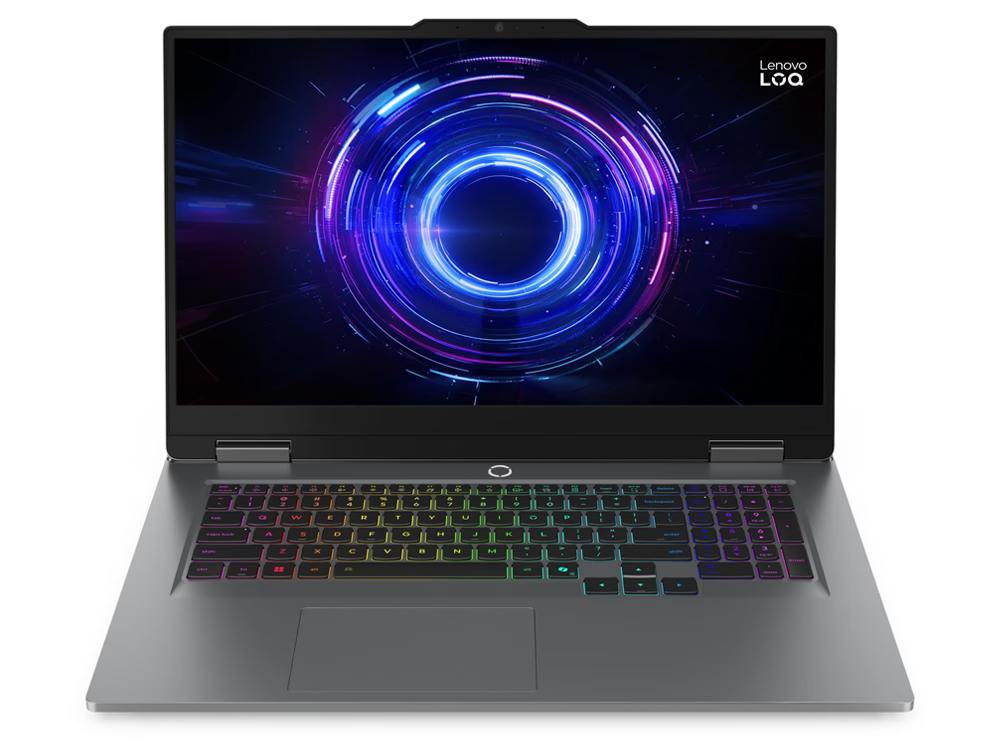
The Lenovo LOQ 17 is a 17 inch gaming laptop for people who want a big screen and serious performance without paying premium-brand prices. This model pairs NVIDIA’s GeForce RTX 5070 Laptop GPU with Intel’s 20-core Core i7-14700HX, 24GB of DDR5 and a 1TB NVMe SSD, with a 17.3-inch Full HD high-refresh screen, a backlit keyboard and Windows 11, all in a Luna Grey finish.
It’s $3,199.
Who the Lenovo LOQ 17 suits
- gamers who want a big 17-inch screen for immersive play
- people replacing a desktop with something they can move between rooms
- students in design, engineering or game development who also game
- streamers and creators who want plenty of screen space for timelines
Prefer a sharper QHD screen in a 15.6-inch body? See our MSI Katana 15 HX RTX 5070 laptop. For a lower price, there’s our RTX 5060 laptop.
Why choose a 17 inch gaming laptop?
Most gaming laptops are 15 or 16 inches. A 17 inch gaming laptop trades a bit of portability for a much bigger, more comfortable view, which is great if your laptop mostly lives on a desk, if you play long sessions, or if you also edit video or code. It’s the closest thing to a desktop monitor you can fold up and take with you.
Lenovo LOQ or Legion?
LOQ is Lenovo’s value gaming range, sitting below its premium Legion laptops. The Lenovo LOQ focuses on the parts that make games run well, like the RTX 5070 and an HX processor, and saves money on extras such as premium materials. If you want maximum performance per dollar, the LOQ range is where to look.
RTX 5070 graphics
The GeForce RTX 5070 Laptop GPU has 8GB of fast GDDR7 memory, and Lenovo runs it at up to 115W in the LOQ 17. As part of the RTX 50 series, it supports:
- DLSS 4 with Multi Frame Generation in supported games, for much higher frame rates
- ray tracing for realistic lighting and reflections
- NVIDIA Reflex for lower input lag in shooters
- AV1 hardware encoding for streaming and recording
As with most RTX 5070 laptops, the 8GB of video memory means the very heaviest new games may need textures lowered a notch at maximum settings.
A 20-core Intel Core i7-14700HX
The Core i7-14700HX has 20 cores (8 performance and 12 efficient) and 28 threads, with turbo speeds up to 5.5GHz. It’s a high-performance HX processor that keeps frame rates up in CPU-heavy games and handles streaming, video exports and 3D work with ease. Lenovo publishes the full details in its LOQ 17IRX10 PSREF sheet.
Lenovo LOQ 17 specifications
| Model | Lenovo LOQ 17IRX10 |
|---|---|
| Processor | Intel Core i7-14700HX (20 cores, 28 threads, up to 5.5GHz) |
| Graphics | NVIDIA GeForce RTX 5070 Laptop GPU, 8GB GDDR7, up to 115W |
| Display | 17.3-inch Full HD (1920 x 1080), IPS, anti-glare, high refresh rate |
| Memory | 24GB DDR5 |
| Storage | 1TB NVMe SSD |
| Ports | USB-C, USB-A, HDMI, Ethernet (RJ-45), audio jack |
| Wireless | Wi-Fi 6 |
| Keyboard | Backlit |
| Colour | Luna Grey |
| Operating system | Windows 11 |
A big 17.3-inch screen
A 17 inch gaming laptop gives you a noticeably bigger view than a 15.6-inch model, which makes games more immersive and gives you more room for timelines, code or a chat window beside your game. The Full HD resolution pairs well with the RTX 5070, keeping frame rates high, and the high refresh rate makes fast games look smooth.
24GB of DDR5 and 1TB of storage
24GB of DDR5 gives you more headroom than the usual 16GB, which helps when you’re gaming with Discord, a browser and OBS running in the background. The 1TB NVMe SSD holds a good-sized game library with fast load times.
What to expect in games
- Esports: very high frame rates in Valorant, CS2, Fortnite and Apex Legends.
- Modern AAA games: high to maximum settings at 1080p in most titles.
- Ray tracing: very playable with DLSS 4 turned on.
Getting more FPS
- Plug in the charger. Laptops reduce performance on battery.
- Turn on DLSS and frame generation in supported games.
- Use the NVIDIA app to keep drivers updated and apply recommended settings.
- Choose Lenovo’s performance mode when plugged in.
Streaming and recording
NVIDIA’s hardware encoder lets you stream with OBS while gaming at high settings, with very little impact on performance, and the 24GB of DDR5 leaves room for streaming software, chat and browser sources.
For creators and students
The Lenovo LOQ 17’s big screen and RTX 5070 make it a good fit for video editing in Premiere Pro or DaVinci Resolve, 3D work in Blender, game development in Unreal Engine or Unity, and CAD for design and engineering students. The extra screen space is genuinely useful for timelines and toolbars.
Cooling and noise
High-performance gaming laptops produce a lot of heat, and the fans are clearly audible in demanding games. Use it on a hard, flat surface with the vents clear, and switch to a quieter mode in Lenovo Vantage for study or video.
Weight and battery
A 17 inch gaming laptop is a big machine. Lenovo lists the LOQ 17 from around 2.9kg, and gaming laptops with this much performance use a lot of power, so battery life is short. Think of it as a desktop replacement you can move, and keep the charger plugged in for gaming.
Settings tips by game type
- Competitive shooters: favour frame rate over detail, and turn on Reflex.
- Open-world games: use DLSS Quality for sharp visuals and smooth performance.
- Story-driven games: turn on ray tracing and frame generation to enjoy the visuals.
- Older titles: max everything out.
Buying for a teenager?
A gaming laptop doubles as a study machine, which makes it a popular gift. Set up a child account with Microsoft Family Safety and Xbox family settings to manage screen time, purchases and online chat, and agree on a few simple rules up front.
Keeping it secure
Keep Windows Update and Windows Security on, download games only from trusted stores, and turn on two-factor authentication for Steam, Epic and your Microsoft account.
Setting up a gaming desk
A 17 inch gaming laptop makes a great desk setup on its own, but you can go further: add a mechanical keyboard, a gaming mouse and a headset, or connect a second monitor through HDMI or USB-C for chat and guides while you play.
Who should choose something else
If you’ll carry your laptop every day, a lighter 15.6-inch model will be much easier on your back. If you want a sharper QHD screen, look at the MSI Katana 15 HX. If you want a big screen and strong 1080p performance at a sensible price, the Lenovo LOQ 17 is a great fit.
Accessories worth adding
- a 17-inch gaming backpack
- a gaming mouse and large mouse pad
- a headset with a microphone
- a laptop cooling stand
Setting it up
- Charge it fully and switch on.
- Connect to Wi-Fi or Ethernet and sign in to Windows 11.
- Run Windows Update and Lenovo Vantage updates.
- Install the latest NVIDIA driver through the NVIDIA app.
- Choose Lenovo’s performance mode when plugged in for gaming.
How it compares with our other gaming laptops
- MSI Katana 15 HX: an RTX 5070 laptop with a 15.6-inch QHD 165Hz screen.
- MSI Katana 15 HX: an RTX 5060 laptop with a QHD 165Hz screen.
- MSI Vector 17 HX AI: a flagship 17-inch RTX 5090 laptop.
Browse all of our gaming laptops.
Our honest take
The Lenovo LOQ 17 is big and heavy, the fans get loud in demanding games, and battery life is short. In return, you get an RTX 5070, a 20-core HX processor, 24GB of DDR5 and a 1TB SSD behind a large 17.3-inch screen, at a price that’s hard to argue with.
Delivery
We deliver Australia-wide, including regional areas.
Support from a local store
If you need help with drivers, game settings or upgrades, message our team on live chat.
Lenovo LOQ 17 FAQs
Is the Lenovo LOQ 17 good for gaming?
Yes. The RTX 5070 and i7-14700HX handle modern games at high settings on its 1080p screen.
Is the Lenovo LOQ good for students?
Yes, especially for design, engineering and game development courses. Just keep the 2.9kg weight and short battery life in mind if you’ll carry it to campus every day.
Can I connect a monitor?
Yes, through HDMI or USB-C.
Can I upgrade the memory?
Lenovo lists up to 32GB of DDR5 for this model. Message us for compatible options.
How heavy is it?
Lenovo lists it from around 2.9kg.
Does it have Ethernet?
Yes. A wired network port gives you the most stable connection for online games.
Can I use a controller?
Yes. Xbox and PlayStation controllers work over USB or Bluetooth with most PC games.
Does it come with Windows?
Yes, Windows 11 is installed.
Is a 17 inch gaming laptop too big for a backpack?
It needs a 17-inch backpack or sleeve. Most gaming backpacks have a dedicated compartment that fits.
Can it run Cyberpunk 2077?
Yes, at high settings at 1080p with DLSS, and ray tracing is playable with frame generation turned on.
Do you deliver Australia-wide?
Yes, to every state and territory, including regional areas.