Description
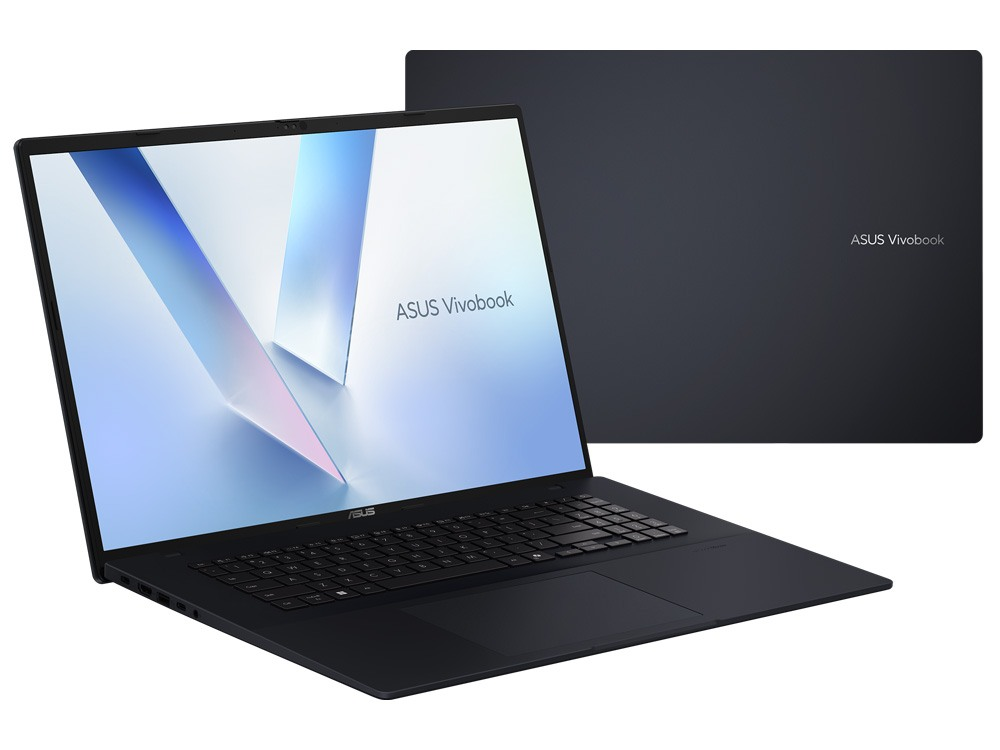
The ASUS Vivobook 18 (M1807HA) is a brand-new laptop with something most laptops don’t have: a huge 18-inch screen. It pairs an AMD Ryzen 7 260 processor with 16GB of DDR5 RAM and a roomy 1TB SSD, in an understated Quiet Blue finish. If you spend your days with spreadsheets, documents, design apps or two windows side by side, the extra screen space makes a real difference.
It comes with a 12-month warranty.
Who this 18 inch laptop suits
- people who want a laptop that can replace a desktop and monitor
- graphic designers and content creators working on 2D design and social content
- students who keep lecture notes and research open side by side
- anyone who finds 14-inch and 15-inch screens too small for comfortable work
Prefer something lighter to carry? Our ASUS Vivobook Go 15 is smaller and cheaper. Need a business laptop with Windows 11 Pro? See our Lenovo ThinkBook 16 G7.
Why choose an 18 inch laptop?
Most laptops top out at 15 or 16 inches. An 18 inch laptop gives you noticeably more room: two documents side by side at a readable size, a full spreadsheet without constant scrolling, or a design canvas with space left over for panels and tools. For people who mostly work at a desk but still want to move around the house or office, it’s a comfortable middle ground between a laptop and a desktop.
A big 18-inch screen
ASUS specifies an 18-inch WUXGA (1920 x 1200) IPS-level panel for this model, with a 16:10 shape, a 144Hz refresh rate, an anti-glare finish and 100% sRGB colour coverage. In practical terms, you get more vertical space for documents and timelines, smoother scrolling than a standard 60Hz screen, and colours that are accurate enough for web and social design work.
AMD Ryzen 7 performance
The AMD Ryzen 7 260 has 8 cores and 16 threads with boost speeds up to 5.1GHz, so it handles everyday multitasking with ease, and its built-in Radeon graphics take care of video playback, photo editing and design apps. Combined with 16GB of DDR5 memory, it keeps Chrome, Office, Teams, Photoshop and Spotify running together without slowing down. ASUS lists the full model details on its Vivobook 18 (M1807) specifications page.
ASUS Vivobook 18 specifications
| Model | ASUS Vivobook 18 (M1807HA) |
|---|---|
| Display | 18-inch WUXGA (1920 x 1200), 16:10, 144Hz, anti-glare |
| Processor | AMD Ryzen 7 260 (8 cores, 16 threads, up to 5.1GHz) with Radeon graphics |
| Memory | 16GB DDR5 |
| Storage | 1TB NVMe SSD |
| Ports | 2 x USB-C (with power delivery and DisplayPort), 2 x USB-A, HDMI, audio jack |
| Wireless | Wi-Fi 6 |
| Colour | Quiet Blue |
| Operating system | Windows 11 Home |
| Condition and warranty | Brand new, 12-month warranty |
A laptop for graphic design: what to expect
The old saying about laptops for designers is that the screen matters as much as the processor. On that front, the Vivobook 18’s big, colour-accurate screen is a genuine strength. It’s a good laptop for graphic design work such as:
- Photoshop, Illustrator and InDesign for print and digital layouts
- Canva, Figma and Affinity for social, web and UI design
- Lightroom photo editing
- 1080p video editing for social media in CapCut or Premiere Pro
To be clear about its limits: it uses integrated graphics, not a dedicated graphics card. For heavy 3D, 4K video editing or game development, choose a laptop with an NVIDIA graphics card, such as our MSI Katana 15 HX.
Setting up a design workflow
To get the most from this laptop for graphic design, keep Creative Cloud or Affinity files on the SSD while you work, sync finished projects to the cloud, and use a mouse or drawing tablet for precise work. Set Windows display scaling to 125% so tool panels are comfortable to read, and use the extra vertical space of the 16:10 screen for layers, swatches and timelines.
Colour tips for designers
A 100% sRGB screen covers the colour space used on the web and most social platforms, which makes it a good match for digital design. For print work, soft-proof in Photoshop or InDesign, and for the most consistent colour, calibrate the screen with a hardware calibrator every few months.
1TB of storage
The 1TB SSD gives you plenty of space for design files, photos, course materials and apps, with fast load times. Creatives build up big asset libraries quickly, so it’s good to start with a generous drive.
Is an 18 inch laptop portable enough?
An 18-inch screen means a bigger laptop. At around 2.6kg, it’s portable enough to move between rooms, the office and home, but it’s heavier than a typical 14-inch or 15-inch laptop. Think of it as a desktop replacement you can take with you, rather than an everyday carry for long commutes.
What the ASUS Vivobook 18 handles well
- Office work with multiple windows open side by side
- 2D design, photo editing and social content
- study, research and online classes
- streaming movies and shows on a big screen
18 inch laptop or laptop plus monitor?
Many people pair a small laptop with an external monitor at their desk. That works well if you always sit in the same place. An 18 inch laptop gives you a big screen everywhere, from the kitchen table to the couch or a client’s office, with no extra screen to buy or cables to manage. If you move around but still want lots of screen space, the ASUS Vivobook 18 is the simpler option.
Connecting a second screen
If you want even more space at your desk, connect an external monitor through HDMI or USB-C. You can keep your design canvas on one screen and tools, references or email on the other.
Who should choose something else
If you carry your laptop all day, a lighter 14-inch or 15-inch model will be kinder to your shoulders. If you need a dedicated graphics card for 3D, CAD, 4K video or gaming, an NVIDIA laptop is the better match. For big-screen productivity and 2D creative work, though, this model is hard to beat at its price.
Accessories worth adding
- a large laptop backpack or sleeve
- a wireless mouse or a drawing tablet for design work
- a USB-C hub for extra ports at your desk
- a hardware colour calibrator for print work
Keeping it secure
Keep Windows Update and Windows Security on, use a strong PIN, and back up your projects to the cloud or an external drive. Creative files are hard to recreate, so regular backups are worth the habit.
Optional setup and data transfer
Moving from an old laptop? We offer an optional setup or data transfer service, so your files, browser bookmarks and apps are ready to go on your new ASUS Vivobook 18. Message us when you order to arrange it.
Setting it up
- Charge it fully and switch on.
- Connect to Wi-Fi and sign in with your Microsoft account.
- Run Windows Update and MyASUS updates.
- Install your apps and set up OneDrive or Creative Cloud sync.
How it compares with our other laptops
- Lenovo ThinkBook 16 G7: a 16-inch business laptop with Windows 11 Pro.
- ASUS Vivobook Go 15: a lighter 15.6-inch study laptop.
- MSI Katana 15 HX: an RTX 5070 laptop for 3D, video and gaming.
Browse all of our laptops.
Video calls and online classes
The built-in webcam and microphones handle Zoom, Teams and Google Meet, and the large screen makes it easy to see everyone in a gallery view while you keep notes open beside the call. A headset helps in busy homes and shared offices.
Our honest take
This isn’t a gaming machine or a featherweight laptop, and we won’t pretend otherwise. What it does very well is screen space: a big, sharp, colour-accurate display, a capable processor, 16GB of RAM and 1TB of storage at a fair price. If screen size matters more to you than weight, it’s an excellent choice.
Delivery
We deliver Australia-wide, including regional areas.
Support from a local store
If you need help with setup, display settings or design apps, message our team on live chat.
ASUS Vivobook 18 FAQs
Is the ASUS Vivobook 18 good for graphic design?
Yes, for 2D design, photo editing and social content, thanks to its large, colour-accurate screen. For heavy 3D or 4K video work, choose a laptop with a dedicated graphics card.
Is an 18 inch laptop too big for uni?
It depends on how far you carry it. It fits in larger laptop backpacks, but at around 2.6kg it’s heavier than a typical student laptop. It’s ideal if you mostly study at home or in one place on campus.
How heavy is the ASUS Vivobook 18?
Around 2.6kg.
Can I connect it to a monitor?
Yes, through HDMI or one of the USB-C ports with DisplayPort.
Can it run Adobe Creative Cloud?
Yes. Photoshop, Illustrator, InDesign and Lightroom run well for 2D design and photo editing.
Is it good for watching movies?
Yes. The 18-inch screen makes it a great laptop for streaming shows and movies at home.
Does it charge over USB-C?
The USB-C ports support power delivery, so compatible USB-C chargers can be used.
Is it brand new?
Yes, it’s brand new with a 12-month warranty.
Do you deliver Australia-wide?
Yes, to every state and territory, including regional areas.