Description
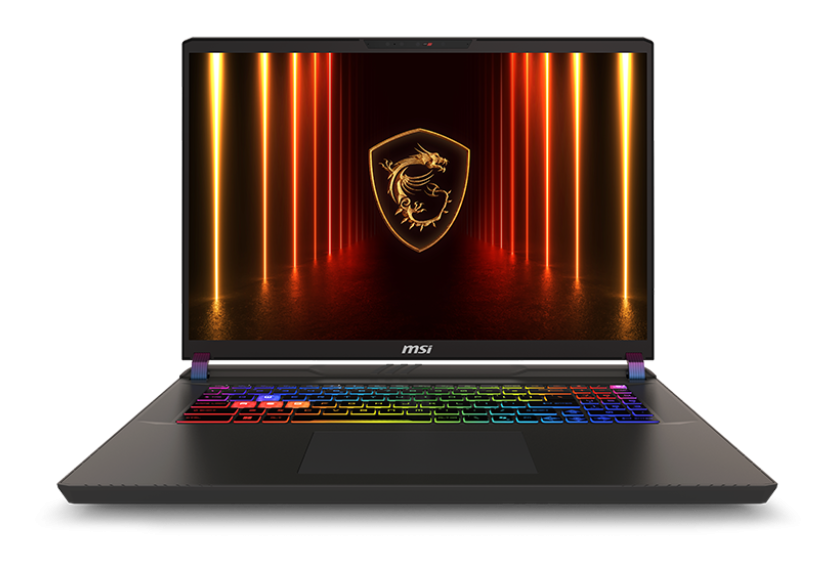
The MSI Vector 17 HX AI is an RTX 5090 laptop for people who want the fastest graphics you can carry. It pairs NVIDIA’s GeForce RTX 5090 Laptop GPU, with 24GB of GDDR7 running at up to 175W, with Intel’s 24-core Core Ultra 9 275HX, 32GB of DDR5 and a 2TB NVMe SSD. A 17-inch QHD+ 240Hz screen, two Thunderbolt 5 ports, Wi-Fi 7 and 2.5Gb Ethernet round out a machine built for high-end gaming, AI and professional work.
It’s currently $6,499, down from $7,799. This is the Australian model, A2XWJG-078AU.
Who the MSI Vector 17 suits
- gamers who want maximum settings at QHD+ in a portable machine
- AI developers and data scientists who need 24GB of video memory on the go
- 3D artists, video editors and game developers who travel between studios and clients
- engineers running simulations and CAD away from a desktop
Don’t need flagship power? Our MSI Katana 15 HX RTX 5070 laptop costs about half as much. If you’ll mostly work at one desk, our RTX 5090 desktop with a Ryzen 9 9950X3D delivers even more performance.
A full-power RTX 5090 laptop GPU
Not every RTX 5090 laptop runs its graphics card at the same power. In the MSI Vector 17 HX AI, the RTX 5090 Laptop GPU can draw up to 175W with Dynamic Boost, the top of NVIDIA’s range for this chip, so you get the performance the GPU was designed for. MSI’s OverBoost Ultra lets the processor and graphics card share up to 250W combined. You also get:
- 24GB of GDDR7 video memory, the most available in a laptop GPU, ideal for high-resolution textures, large 3D scenes and AI models
- DLSS 4 with Multi Frame Generation for much higher frame rates in supported games
- full ray tracing and path tracing in the latest games
- a MUX switch, which lets the GPU drive the screen directly for better gaming performance
Intel Core Ultra 9 275HX
The Core Ultra 9 275HX is Intel’s flagship laptop processor, with 24 cores (8 performance and 16 efficient) and turbo speeds up to 5.4GHz. It also includes an NPU for AI features in Windows 11. That’s desktop-class processing for high frame rates, streaming, compiling code, rendering and simulations. MSI lists the full details on its Vector 17 HX AI product page.
RTX 5090 laptop specifications
| Model | MSI Vector 17 HX AI A2XWJG-078AU |
|---|---|
| Processor | Intel Core Ultra 9 275HX (24 cores, up to 5.4GHz) |
| Graphics | NVIDIA GeForce RTX 5090 Laptop GPU, 24GB GDDR7, up to 175W with Dynamic Boost |
| Display | 17-inch QHD+ (2560 x 1600), 240Hz, IPS-level |
| Memory | 32GB DDR5 (2 x 16GB) |
| Storage | 2TB PCIe Gen4 NVMe SSD |
| Ports | 2 x Thunderbolt 5, 2 x USB-A, HDMI 2.1, SD card reader, 2.5Gb Ethernet, audio combo jack |
| Wireless | Wi-Fi 7, Bluetooth 5.4 |
| Weight | Around 3kg |
| Operating system | Windows 11 Home |
A 17-inch QHD+ 240Hz screen
The 17-inch display uses a 16:10 QHD+ resolution of 2560 x 1600, which gives you more vertical space than a standard widescreen, great for timelines, code and tall web pages. The 240Hz refresh rate keeps fast games incredibly smooth, and MSI specifies wide colour coverage, making it a strong screen for photo and video work too.
32GB of DDR5 and 2TB of storage
32GB of DDR5 in dual-channel handles gaming, streaming and heavy creative work without breaking a sweat, and the laptop supports more memory if you need it later. The 2TB NVMe SSD gives you room for a large game library, big project files and datasets, with fast load times throughout.
What to expect in games
- Modern AAA games: maximum settings at QHD+ in most titles.
- Ray tracing and path tracing: the RTX 5090 handles the most demanding lighting modes, especially with DLSS 4.
- Esports: extremely high frame rates that make full use of the 240Hz screen.
- VR and external monitors: plenty of headroom for a high-refresh 4K monitor at your desk.
AI, CUDA and professional workloads
With 24GB of video memory, this RTX 5090 laptop can run local AI models that simply won’t fit on smaller GPUs. It handles larger language models in tools like Ollama and LM Studio, image generation in ComfyUI, and CUDA workloads in PyTorch and TensorFlow. For creative pros, it accelerates Premiere Pro, DaVinci Resolve, Blender, Unreal Engine, Omniverse and many CAD and simulation tools.
Running local AI on an RTX 5090 laptop
Video memory decides which AI models you can run at full speed, and 24GB puts this RTX 5090 laptop in a different league from 8GB and 12GB machines. Quantised language models well beyond the 14B size fit comfortably, image generation in Flux and SDXL runs at high resolution, and you can fine-tune smaller models with LoRA. For developers who want to prototype privately, on the move, without renting cloud GPUs, it’s a genuinely useful tool rather than just a gaming machine.
For content creators
Editors, colourists and 3D artists get a lot from this machine. The RTX 5090’s hardware encoders speed up exports in Premiere Pro and DaVinci Resolve, including support for 4:2:2 footage from many newer cameras, while Blender, Redshift and Octane render quickly on 24GB of fast memory. The SD card reader means you can offload footage straight from your camera on location.
Engineering and simulation on the go
MSI positions the Vector series for STEM professionals, and the hardware backs that up. Engineers can run CAD, simulation and data analysis on site visits, while developers can compile large projects and run containers on the 24-core processor and 32GB of memory.
Connectivity built for professionals
Two Thunderbolt 5 ports give you the fastest external connections available, for high-speed storage, docks and displays. You also get HDMI 2.1 for a 4K high-refresh monitor or TV, two USB-A ports, an SD card reader for cameras, and 2.5Gb Ethernet for fast, stable online gaming and large file transfers. Wi-Fi 7 and Bluetooth 5.4 cover wireless.
Streaming and recording
NVIDIA’s hardware encoders let you stream to Twitch or YouTube with OBS while gaming at high settings, with very little impact on performance. AV1 encoding gives sharper streams and recordings at the same bitrate on platforms that support it, and the NVIDIA app’s Instant Replay saves your best moments automatically.
Windows Hello and a per-zone RGB keyboard
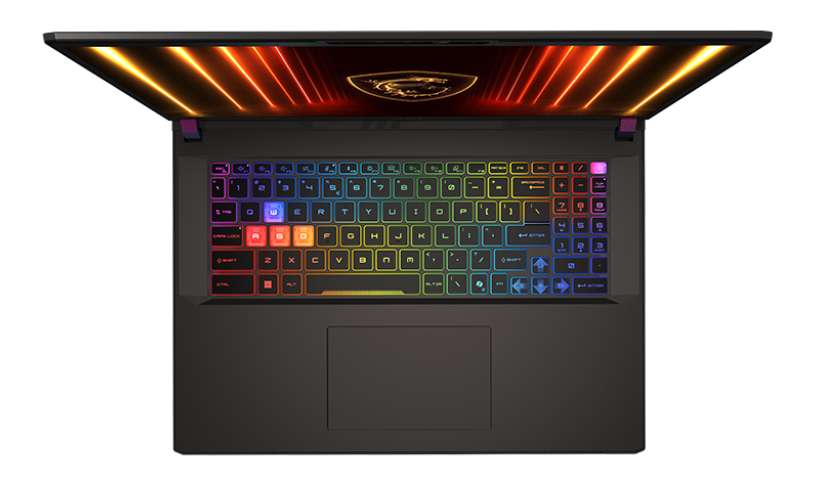
The Vector 17 HX AI range uses an infrared Full HD webcam, so you can sign in to Windows with your face using Windows Hello. The keyboard has per-zone RGB lighting you can customise or dim, plus a full number pad and a Copilot key.
Cooling, power and noise
Running a 175W graphics card and a 24-core processor in a laptop takes serious cooling, and the fans are loud at full load, as on any flagship RTX 5090 laptop. For the best results, use it on a hard surface with clear vents, keep the charger connected, and use MSI Center’s quieter modes for study, browsing and video.
Multiple monitors and VR
Between HDMI 2.1 and two Thunderbolt 5 ports, you can connect several external displays for a multi-screen workspace, a high-refresh 4K gaming monitor, or a PC VR headset. Message us if you’d like help choosing cables or a dock that suits your setup.
Portability
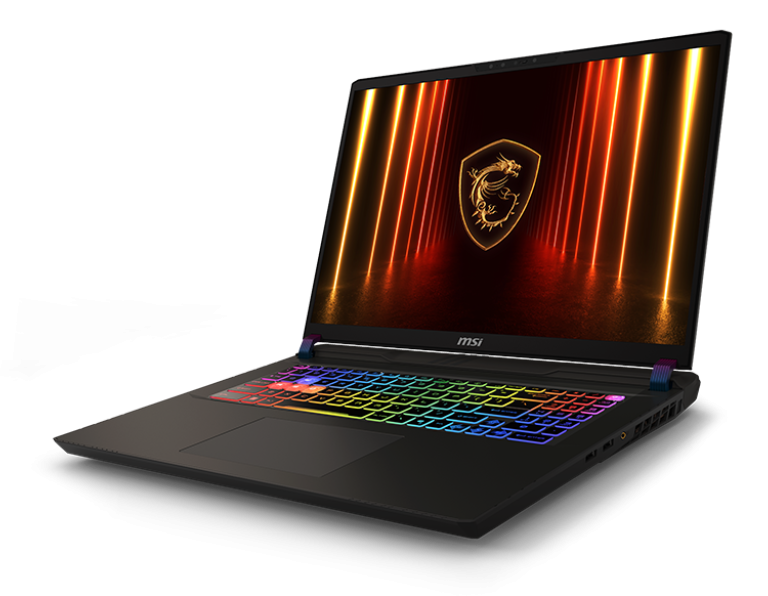
At around 3kg plus its large power adapter, the MSI Vector 17 is a desktop replacement you can move, rather than an everyday carry laptop. It’s ideal for taking between home, a studio and clients, or to LAN events, but if you need something light for daily commuting, a smaller model will suit you better.
Game settings tips
- Plug in the charger and choose MSI Center’s top performance mode for gaming.
- Use DLSS Quality at QHD+ for a sharp image with higher frame rates.
- Turn on frame generation in single-player games for very smooth motion.
- Use NVIDIA Reflex in competitive shooters to reduce input lag.
- Keep the NVIDIA app open in the background to update drivers when new games launch.
Travelling with a big laptop
A 17-inch laptop and its charger fit in a large gaming backpack, and most airlines allow laptops in carry-on luggage. Keep it in a padded compartment, take it out for airport security when asked, and pack the charger in a separate pocket so it’s easy to find. A short Ethernet cable is handy for hotels and LAN events.
Battery life expectations
A laptop with this much power is designed to perform best on the charger. On battery it’s fine for browsing, documents and video for a while, but gaming or rendering on battery reduces performance and drains it quickly. Plan to plug in whenever you’re doing heavy work.
Setting up a desk with the MSI Vector
At home or in the studio, a Thunderbolt 5 dock turns the MSI Vector into a full workstation: one cable for monitors, fast storage, a keyboard, a mouse and a network connection. Add a 4K high-refresh monitor via HDMI 2.1 and you’ve got a desktop-class setup that unplugs in seconds when you need to travel.
RTX 5090 laptop or RTX 5090 desktop?
A laptop RTX 5090 runs within the power and cooling limits of a portable chassis, so a desktop RTX 5090 graphics card is considerably faster. The laptop’s advantage is that the performance comes with you. If you work and play in one place, a desktop gives more performance per dollar. If you need flagship power in more than one location, the MSI Vector 17 HX AI is one of the best ways to get it.
Is an RTX 5090 laptop worth it?
For most gamers, no, and we’ll tell you that honestly. An RTX 5070 or RTX 5080 laptop handles modern games very well for much less. An RTX 5090 laptop makes sense when you genuinely use what it offers: 24GB of video memory for AI, 3D or high-resolution video work, maximum settings with path tracing, or the confidence that your machine will handle demanding software for years. If that’s you, the MSI Vector 17 HX AI is a strong choice, with full GPU power, a fast processor and professional connectivity.
Software we recommend
Keep the NVIDIA app installed for drivers and game settings, and use MSI Center to switch performance modes and manage the keyboard lighting. Creators should install the NVIDIA Studio Driver when working on deadline-critical projects, and developers can install CUDA and their frameworks as normal.
Keeping it secure
Use Windows Hello sign-in, keep Windows Update and Windows Security on, and enable two-factor authentication for Steam, Epic, cloud storage and work accounts. Back up important projects to the cloud or an external drive.
Looking after a flagship laptop
- Use it on a hard surface with the vents clear.
- Blow dust out of the vents every few months.
- Carry it in a well-padded 17-inch backpack.
- Keep the NVIDIA driver, BIOS and MSI Center updated.
- Avoid leaving it in a hot car.
Accessories worth adding
- a Thunderbolt 5 dock and a 4K high-refresh monitor
- a large gaming backpack with space for the power adapter
- a laptop cooling stand
- a fast external SSD for project files
Who should choose something else
If you mainly play esports titles or popular games at 1080p or 1440p, an RTX 5070 laptop gives you excellent performance for far less money. If portability is your top priority, a thinner 14-inch or 16-inch gaming laptop will be easier to carry. The Vector 17 is for people who genuinely need the very top end.
Setting it up
- Charge it fully and switch on.
- Connect to Wi-Fi or Ethernet and sign in to Windows 11.
- Run Windows Update and MSI Center updates.
- Install the latest NVIDIA driver through the NVIDIA app.
- Choose MSI Center’s performance mode when plugged in for gaming or rendering.
How it compares with our other gaming laptops
- MSI Katana 15 HX: an RTX 5070 laptop with a QHD 165Hz screen.
- Lenovo LOQ 17: a 17.3-inch RTX 5070 laptop with 24GB of DDR5.
- MSI Katana 15 HX: an RTX 5060 laptop with a QHD 165Hz screen.
Browse all of our gaming laptops.
Upgrading later
With two memory slots, memory can be increased beyond 32GB if you move into larger AI or simulation work. The laptop also has room for additional NVMe storage. MSI recommends SSD upgrades are done through a service centre, so message us and we’ll help you plan it properly.
Our honest take
The MSI Vector 17 HX AI is big, heavy and loud when you push it, and it isn’t cheap. In return, you get a full-power RTX 5090 laptop GPU with 24GB of memory, a flagship 24-core processor, a superb 240Hz QHD+ screen and the latest connectivity, all in a machine you can take anywhere. For gamers and professionals who’ll actually use that power, it’s one of the most capable laptops available.
Delivery
We deliver Australia-wide, including regional areas.
Why buy from a local store?
We’ll give you a straight answer about whether an RTX 5090 laptop is the right call for your games and software, even if that means recommending something cheaper. After it arrives, our team is a message away on live chat.
RTX 5090 laptop FAQs
Does the MSI Vector 17 have a full-power RTX 5090?
Yes. The GPU runs at up to 175W with Dynamic Boost, the top of the range for the RTX 5090 Laptop GPU.
Is it good for AI and machine learning?
Yes. 24GB of video memory and full CUDA support make it one of the most capable laptops for local AI work.
Is an RTX 5090 laptop as fast as a desktop RTX 5090?
No. Laptop GPUs run at lower power to fit a portable chassis, so a desktop RTX 5090 is considerably faster. This laptop is about bringing flagship-class performance with you.
Can the MSI Vector 17 drive a 4K monitor?
Yes, through HDMI 2.1 or Thunderbolt 5, including high refresh rate 4K monitors.
Can I upgrade the memory?
Yes. The laptop has two memory slots and supports more than the 32GB installed.
How heavy is it?
Around 3kg, plus the power adapter.
Can it run Cyberpunk 2077 with path tracing?
Yes. With DLSS 4 and frame generation, path tracing is very playable at QHD+.
Does it have a MUX switch?
Yes. It can route the RTX 5090 directly to the screen for the best gaming performance.
Is the screen good for photo and video editing?
Yes. MSI specifies wide colour coverage for this panel, and the 16:10 QHD+ resolution gives you more room for timelines and tools.
Can I use it for VR?
Yes. It has plenty of graphics power for PC VR headsets.
Is it good for university or work?
Yes, for demanding courses and professional work in engineering, design, film or computer science. Just keep the 3kg weight in mind if you’ll carry it every day.
Does it have Ethernet?
Yes, 2.5Gb Ethernet, as well as Wi-Fi 7.
Does it come with Windows?
Yes, Windows 11 Home is installed.
Do you deliver Australia-wide?
Yes, to every state and territory, including regional areas.